ChatGPT Browser Extensions vs Dedicated Summarizers: Where Each One Wins
You can summarize an article using a ChatGPT browser extension or a dedicated AI summarizer. Both work — but they are built for different jobs. Here is how to tell which one fits your reading.
A reasonable question: if you already pay for ChatGPT, and you can summarize any article by either pasting it into the chat or installing a ChatGPT browser extension, why would you use a dedicated summarizer? Both run on similar foundation models. Both can produce a competent summary. So what is the difference, and is the difference worth a second tool?
The answer depends on your reading pattern. If you summarize occasionally — a few articles a week, no specific format requirements, no follow-up actions — a ChatGPT extension is fine. If you summarize as part of a recurring workflow with specific shape and persistence requirements, the differences add up to a meaningfully different experience. This article walks through the actual differences without overselling either side.
What ChatGPT Browser Extensions Are Good At
Be fair to them: the popular ChatGPT browser extensions get one important thing right. They bring the chat interface to the page you are looking at. You do not have to copy text into a new tab. You can ask the model questions about the article without leaving it. For someone who is already comfortable thinking in chat-message terms, this is a real productivity win.
Specifically, ChatGPT extensions are well-suited to:
- Ad-hoc questions about articles. “What is the author’s main argument?” “Is this skeptical or supportive of X?” “Who are the named sources?”
- One-off summaries with no format requirements. You just want the gist of one article.
- Already paying for ChatGPT Plus or similar. No marginal cost.
- Reading mostly short content that fits comfortably within the model’s context window.
If that is your reading life, you do not need to read the rest of this article. ChatGPT extension, install it, move on.
Where the Differences Start to Matter
The differences emerge when reading becomes a recurring activity with shape — specific output structure, multiple articles, longer content, repeatable workflows.
Structured Output Without Reasking
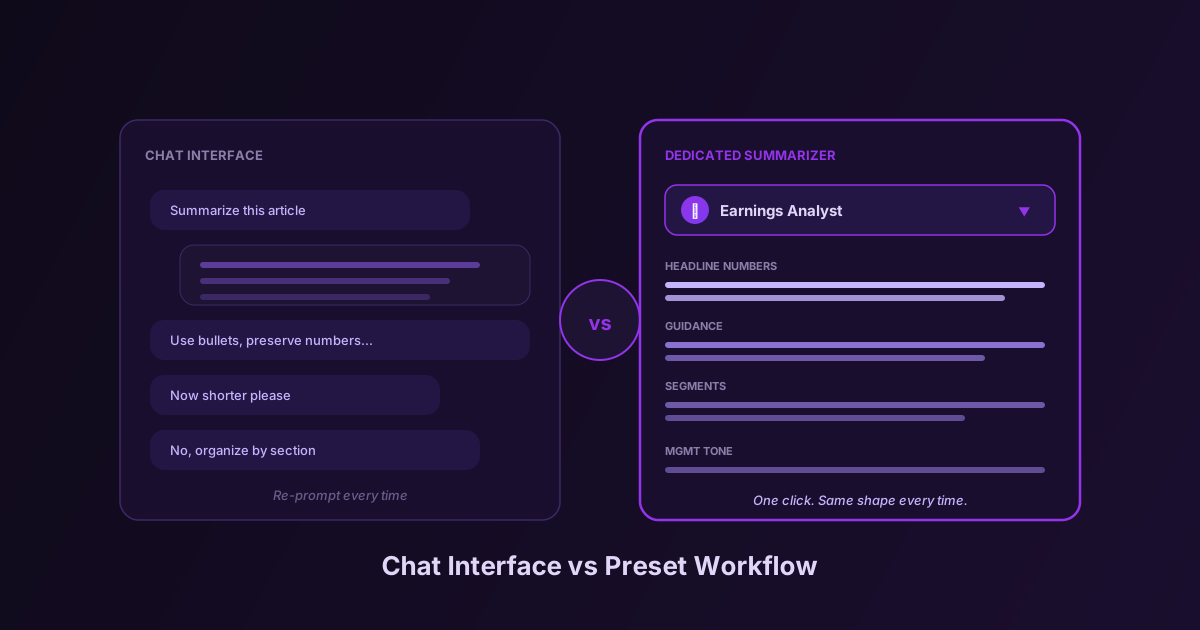
In a chat interface, every summary is a fresh prompt. If you want bullet points, you ask for bullet points. If you want bullet points organized by theme, you ask for that. If you want bullet points organized by theme, with a specific weight given to one section, with management quotes preserved verbatim — you have to type all that, every time.
A dedicated summarizer with a preset system gives you a saved instruction set that runs every time. You write the prompt once, and from then on, every article you summarize with that preset gets the same shape of output. The mental cost of getting a structured summary drops to zero. You click a button.
This is a small difference per summary and a large difference over a month. The first time you write a “Comparative Analysis” or “Earnings Release Analyst” preset, you spend 15 minutes iterating on the prompt. Then you use it 200 times in the next year. The chat-interface equivalent of that workflow is retyping the same instructions 200 times — most people give up and just take whatever the default produces.
Context Window Behavior
ChatGPT extensions handle long content by truncating it. Some extensions are smart about this — they chunk and summarize the chunks, then summarize the summaries. Most are not — they just send the first N tokens and produce a summary of those, possibly with no warning that anything was dropped.
Dedicated summarizers built around reading workflows have to handle long content as a primary case, because long content is what people most want help with. They use chunking strategies that preserve the structure of the original, they handle PDFs natively rather than treating them as text streams, and they tend to be explicit when content has been truncated.
If most of what you summarize is 800 words, this difference does not matter. If you summarize 30-page PDFs or hour-long YouTube transcripts, this is the difference between a usable result and a misleading one.
Persistence and Multi-Source
A chat is a transient artifact. You can scroll up, you can save the conversation, but the summaries do not live in a structured place — they live in a chat log alongside your other questions to the same model. There is no native way to compare summaries across articles, to synthesize across sources, or to revisit “everything I read about X last week”.
A dedicated summarizer with research projects treats each summary as a persistent artifact attached to a topic. You can scan a week of summaries on the same topic, run a cross-source synthesis, find contradictions between sources, build a citation list. None of this is impossible in a chat interface — it is just always a fresh prompt that you have to compose from scratch.
Auto-Highlight and Original-Document Anchoring
ChatGPT extensions generate a summary as new text. The summary lives in a sidebar; the original article is the original article. There is no link between specific claims in the summary and specific sentences in the source.
Dedicated summarizers that support auto-highlight identify the key passages in the original and mark them in place after summarization. This serves verification (you can confirm a summary’s claim by reading the highlighted source sentence) and skimming (you can scroll the original and see the substance highlighted). It is a workflow that does not have a clean chat-interface equivalent.
YouTube and PDF Handling
Most ChatGPT browser extensions describe what they are looking at — a YouTube page, a PDF — rather than reading its content. They will tell you what the video page metadata says (title, view count, channel) instead of summarizing the actual video. Some extensions now fetch transcripts; most still do not, or do it poorly.
Dedicated summarizers built for reading workflows treat YouTube and PDF as core formats. They pull the transcript for video. They parse the PDF properly, including figures, tables, and structure. The difference between “summary of YouTube page metadata” and “summary of the 47-minute talk” is the difference between useless and useful.
Cost Structure
A ChatGPT subscription gives you essentially unlimited summarization, but only at the quality and capabilities of whatever model your plan includes. A dedicated summarizer typically charges based on usage (tokens, summaries per day, etc.). For light users, the dedicated tool is cheaper or free. For very heavy users, ChatGPT can be cheaper but with the workflow tradeoffs described above.
Run the math on your own usage. For most reading patterns, the cost is not the deciding factor — the workflow differences are.
The Honest Test
Here is the test that cuts through the marketing on both sides:
For one week, summarize every article you would normally read using a ChatGPT extension. Count how many times during the week you typed (or wanted to type) phrases like:
- “Make it shorter”
- “Use bullet points”
- “Focus on X”
- “Preserve the numbers”
- “Organize by section”
These are signals that you are doing presets manually, in real time, every summary. If the count is high, a dedicated summarizer with presets will save you noticeable friction. If the count is near zero, you have not hit the workflow ceiling of the chat interface and you do not need the second tool.
The other diagnostic: do you ever want to revisit your summaries from a week ago, organized by topic, across multiple sources? In a chat interface, you can do this, but it requires discipline and effort. In a dedicated summarizer with research projects, it is the default.
When We Would Pick Each
ChatGPT extension wins for:
- Casual readers, occasional summaries
- Open-ended questions about articles, not just summaries
- Reading mostly short, single-format content
- Already paying for ChatGPT, no appetite for a second tool
Dedicated summarizer wins for:
- Recurring workflows with specific output requirements
- Long PDFs and YouTube videos as a regular input
- Reading-heavy roles (analysts, researchers, journalists, students)
- Building knowledge bases or doing multi-source research
- Anyone who reads enough that the per-summary friction starts to compound
The right answer for most people in heavy reading roles is to use both. Use the ChatGPT extension for ad-hoc “what is this article saying?” questions. Use the dedicated summarizer for the recurring workflow where shape, structure, and persistence matter. They are not competitors. They are different tools for different jobs that happen to share an underlying technology.